Case study · RainFocus
Group Pass Management
Designing for the person who answers for everyone’s event pass
- Role
- Lead Product Designer
- Timeline
- 3 months
- Platform
- Responsive web
- Shipped
- Fall 2026
01Overview
How group owners manage passes for the people they’re responsible for
The problem
Every client wanted co-registration made easier, and each had its own version of the request.
The approach
Instead of building each client's version, we designed for the job they all shared: the group owner keeping everyone squared away.
The outcome
One flow, shipped fall 2026, covering most group cases we heard.
- Company
- RainFocus, an enterprise event platform
- Scope
- Product strategy, UX and UI, prototyping
- Team
- Product manager, dev architect, lead developer, 1 front-end and 5 back-end developers. Partnered directly with the CPO and key stakeholders
- Research
- 9 enterprise customers and 5 internal users
- AI tools
- Gemini, Figma and Claude
02The Work
Three decisions, shipped.
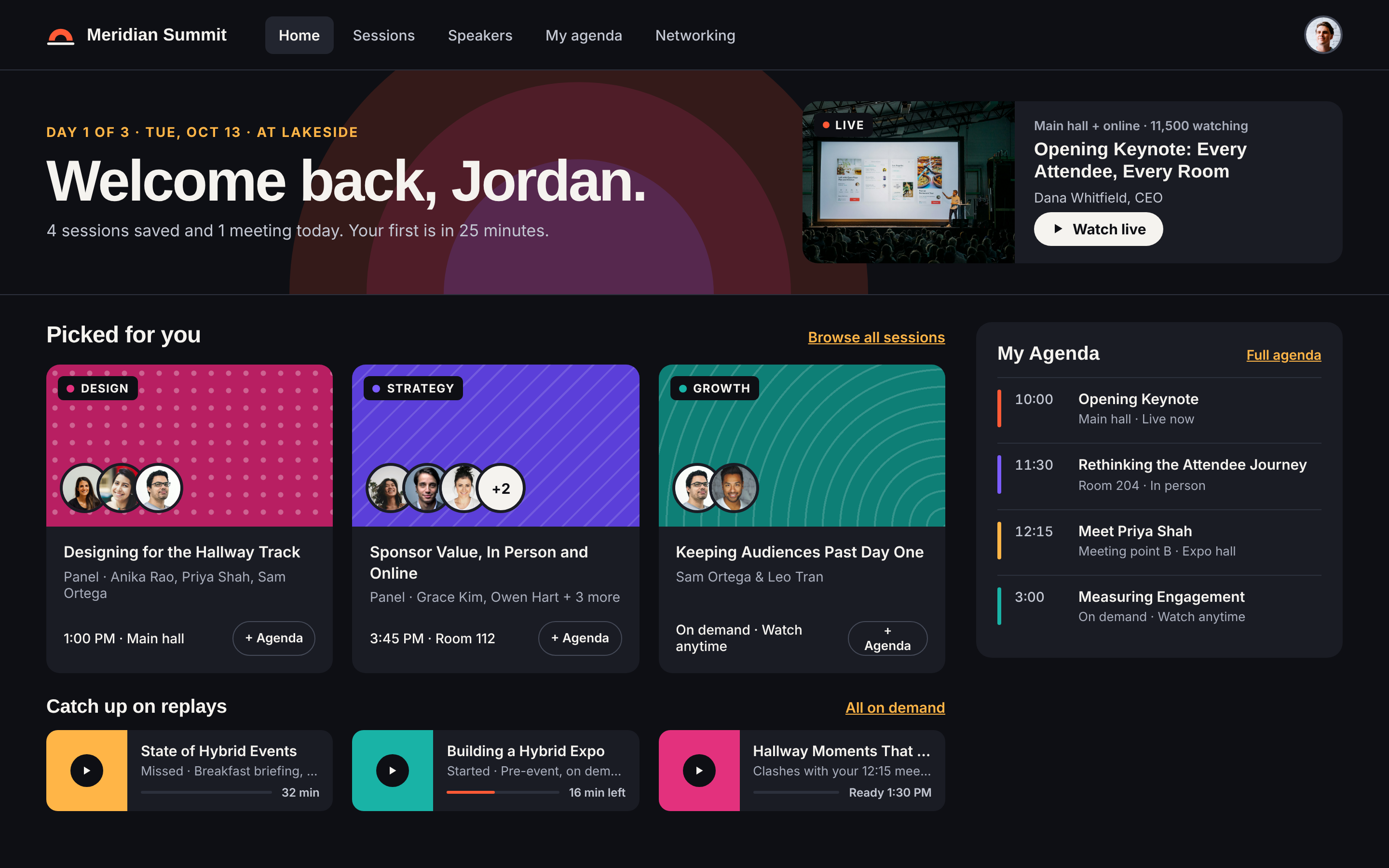
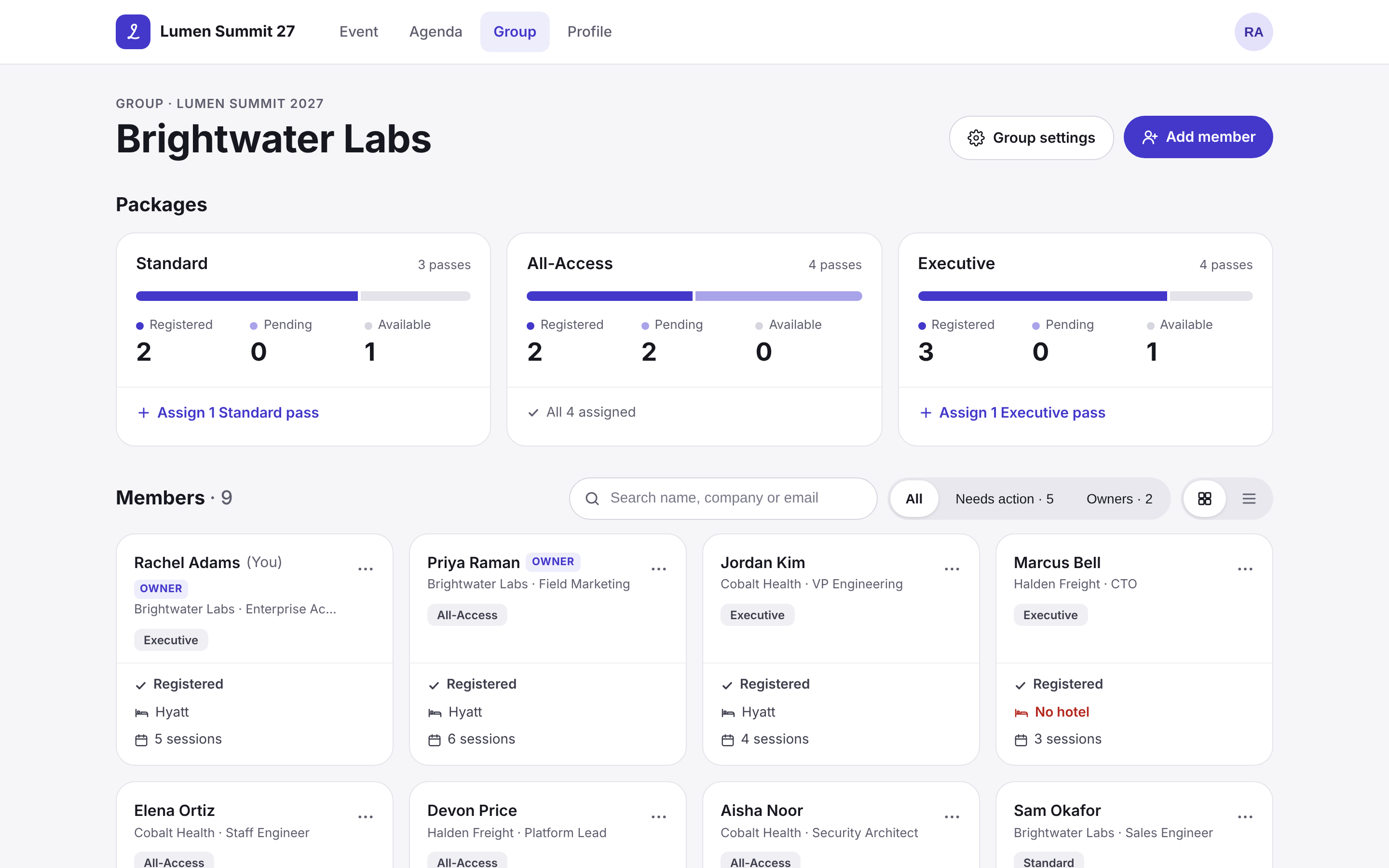
Watch the flow end to end, then see where each decision lives on desktop and mobile. Rebuilt for Lumen Summit, a fictional tech conference, so no client data appears here.
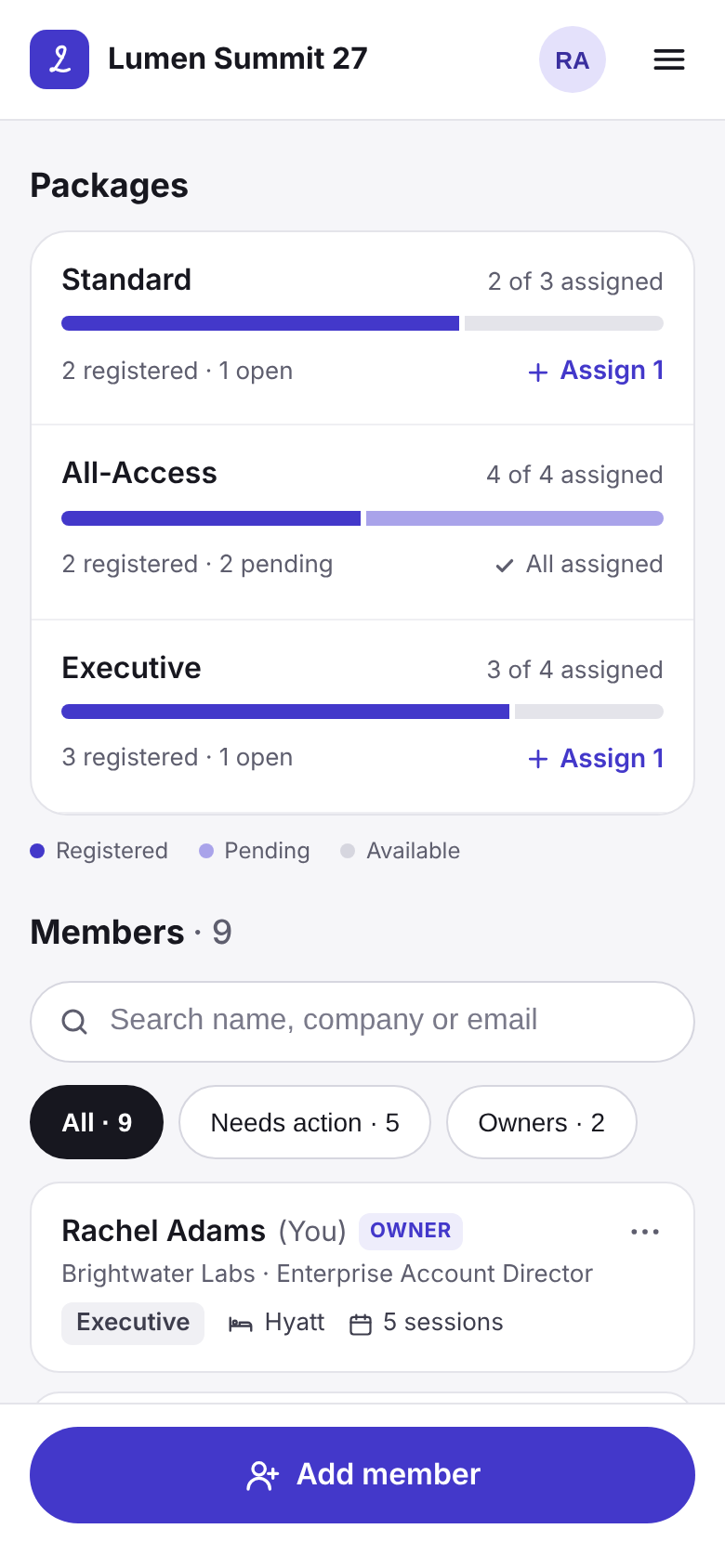
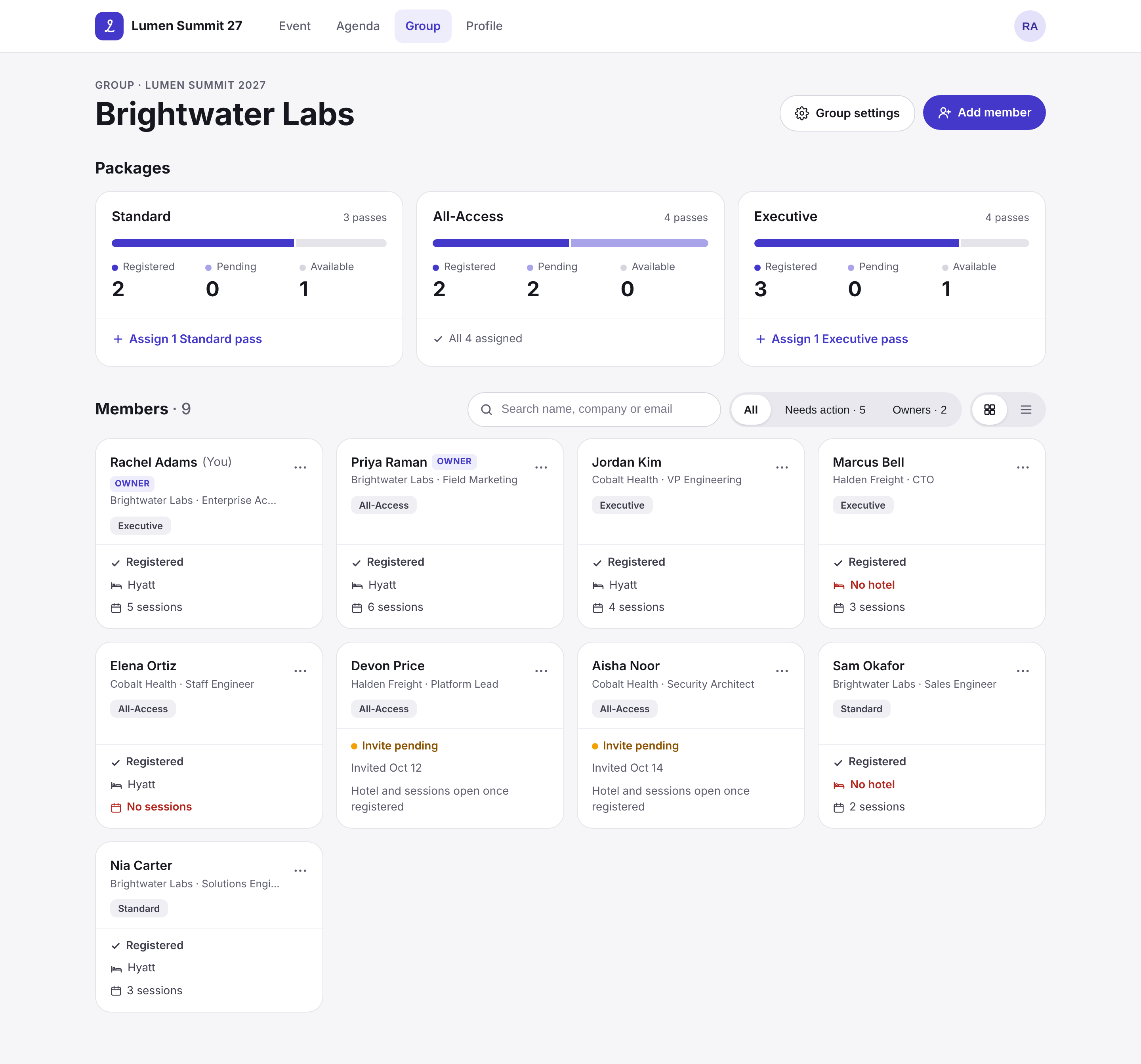
Every pass is accounted for
Packages sit on top as inventory, every member sits below, and what still needs attention comes first. Nothing looks done while an invite is still out.
“Every pass we paid for has a name on it.”
Multiple owners, attending or not
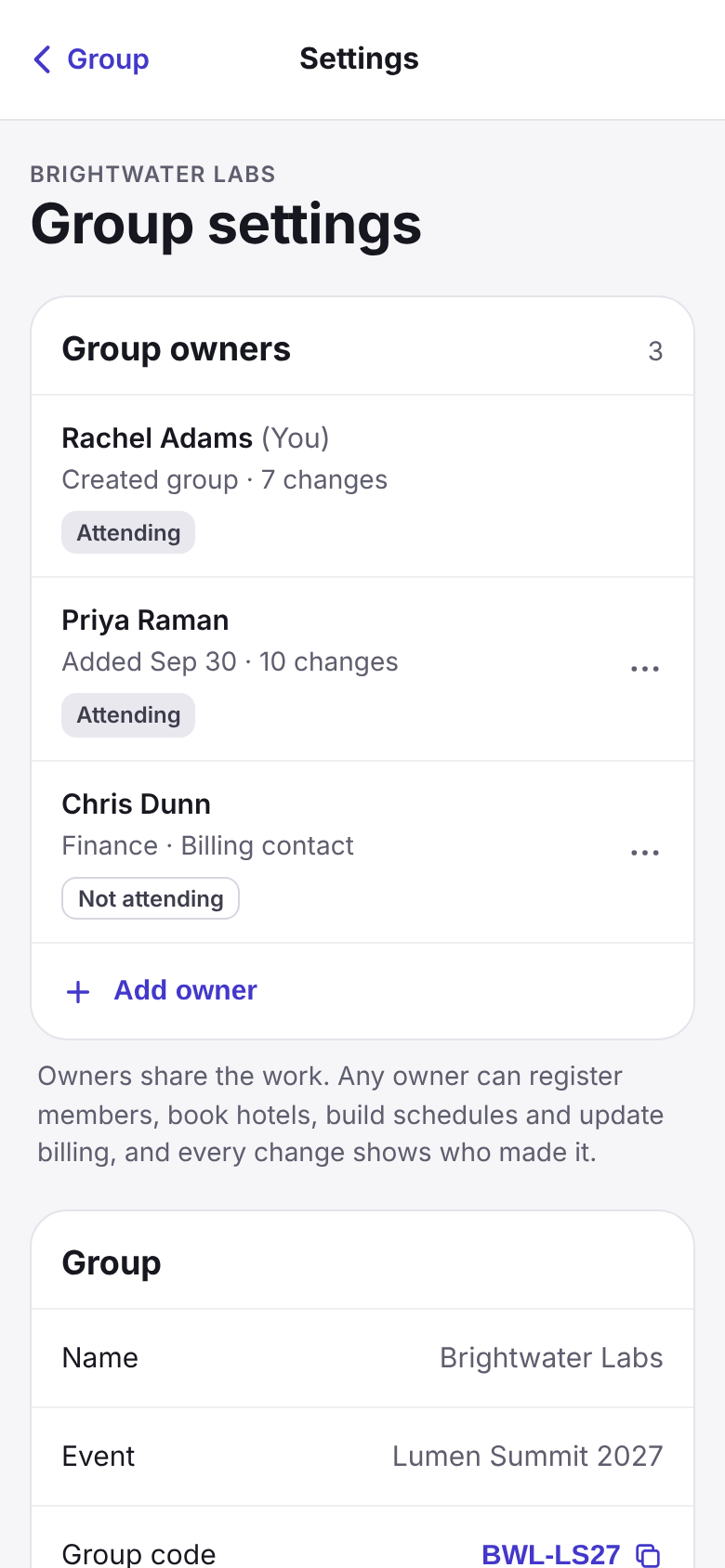
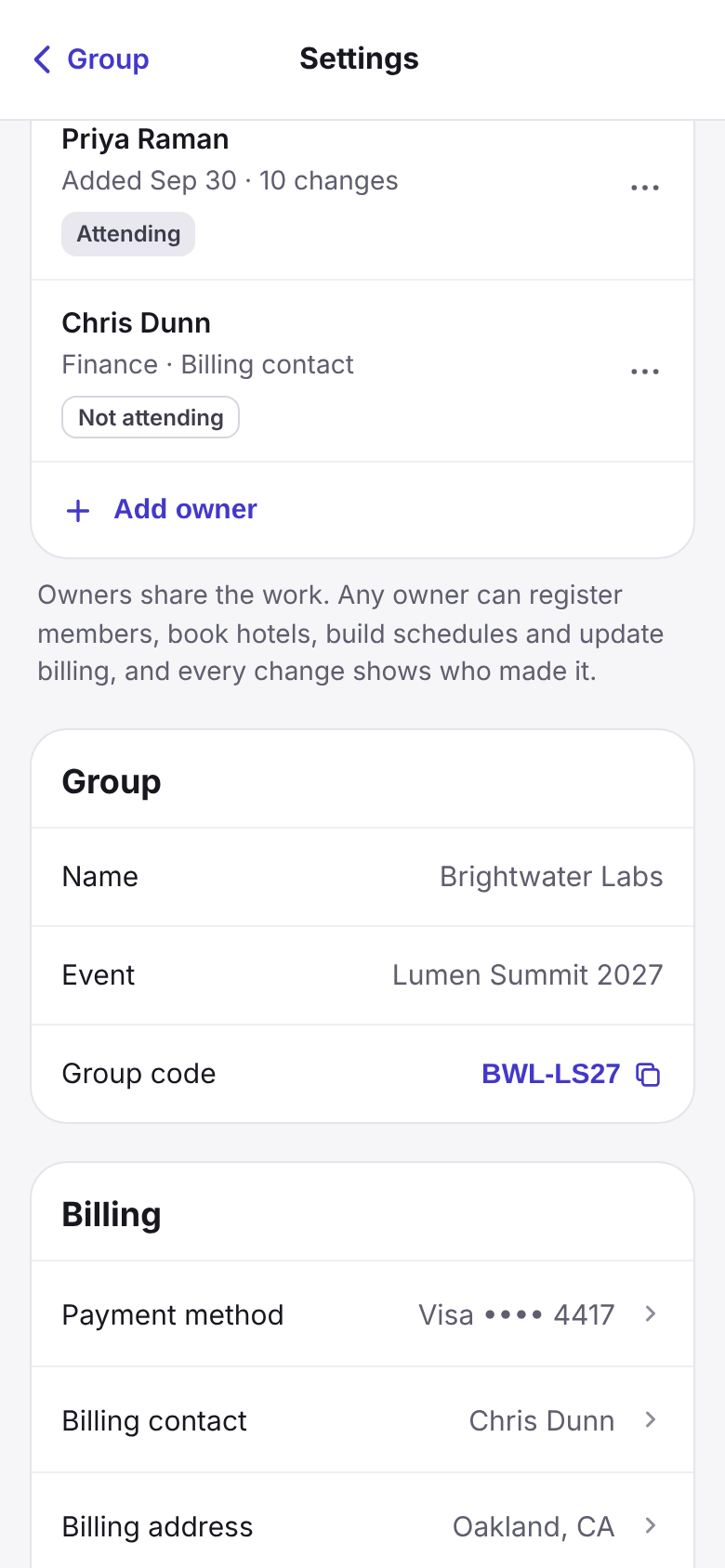
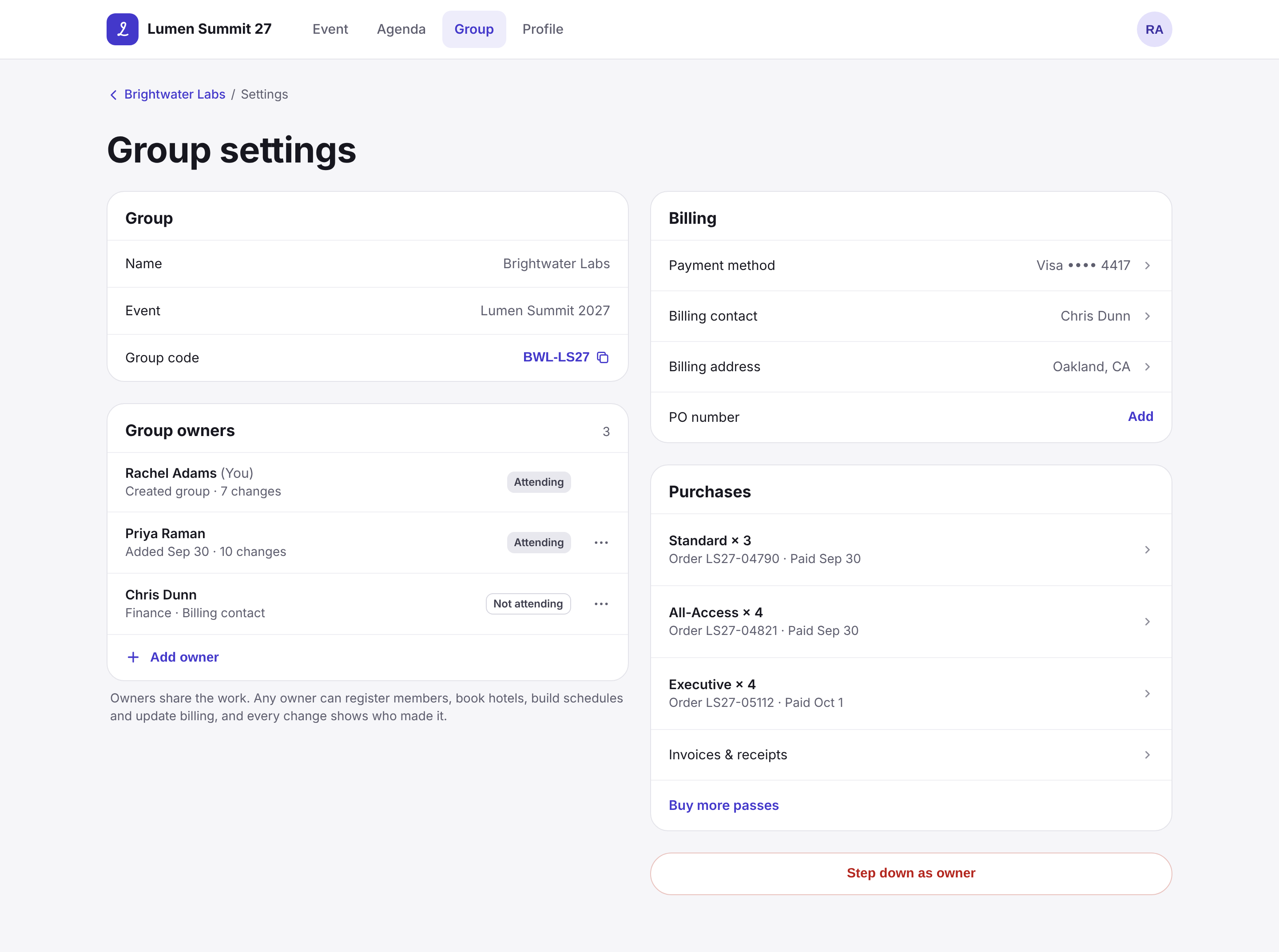
Owners share the work, attending or not, like a finance lead who only handles billing. Every change shows who made it.
“I don’t have to carry this alone.”
Owners act for anyone, members stay informed
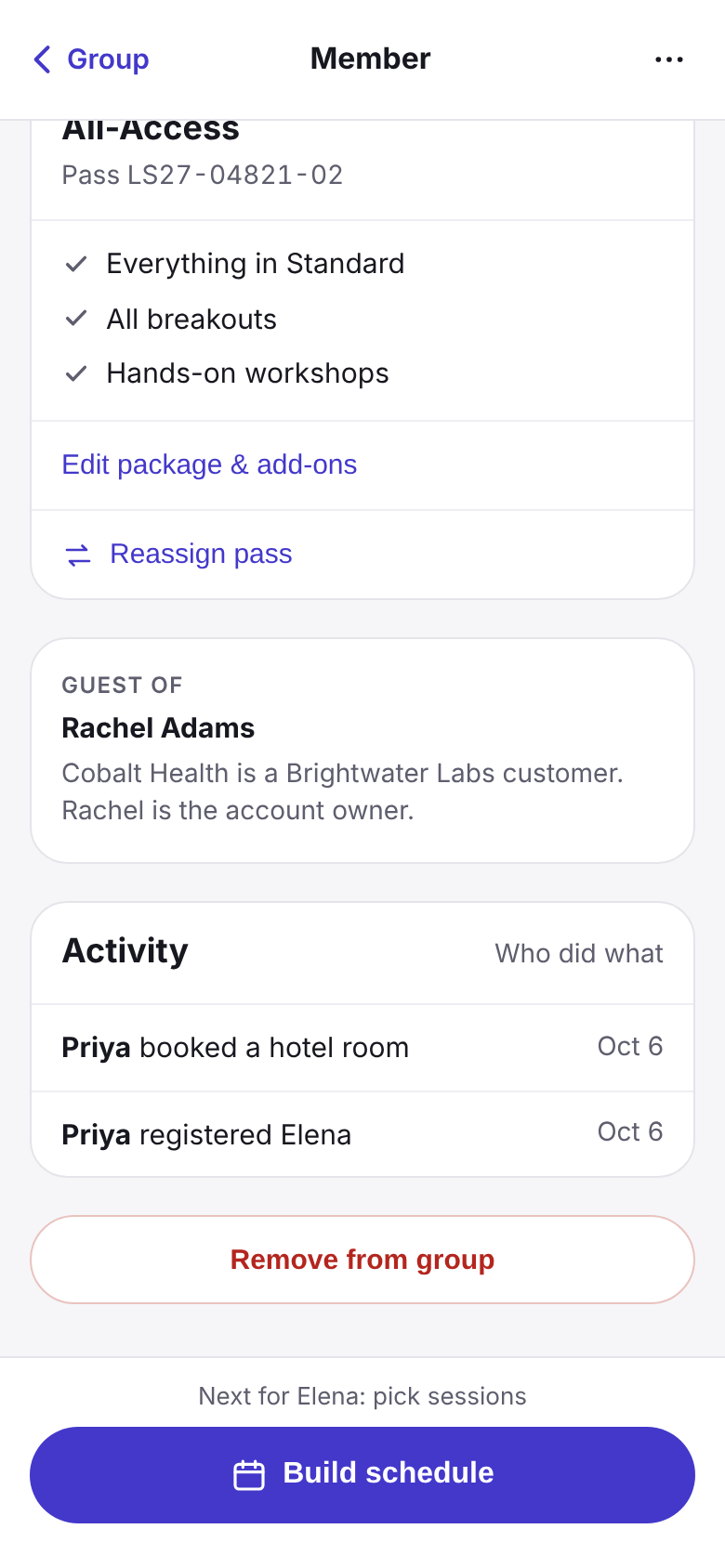
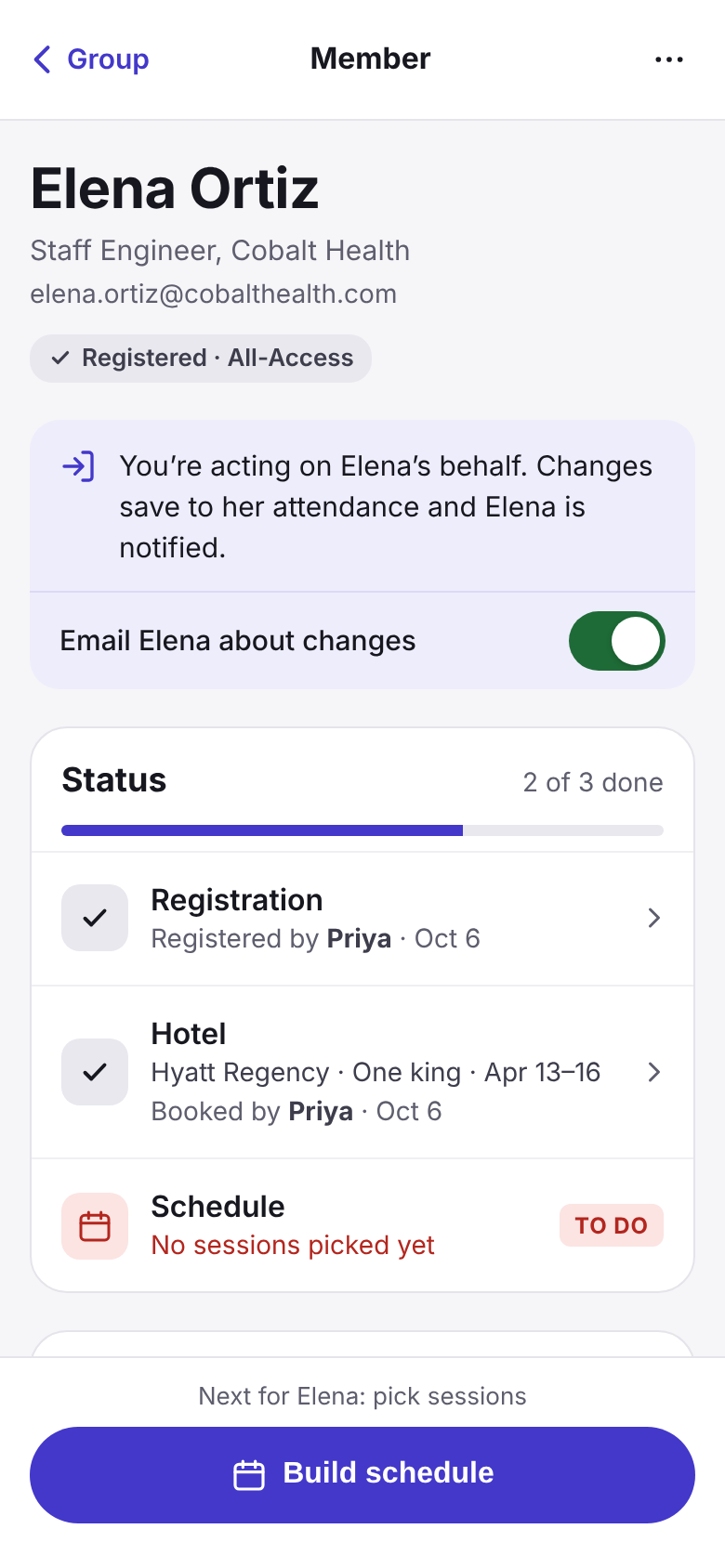
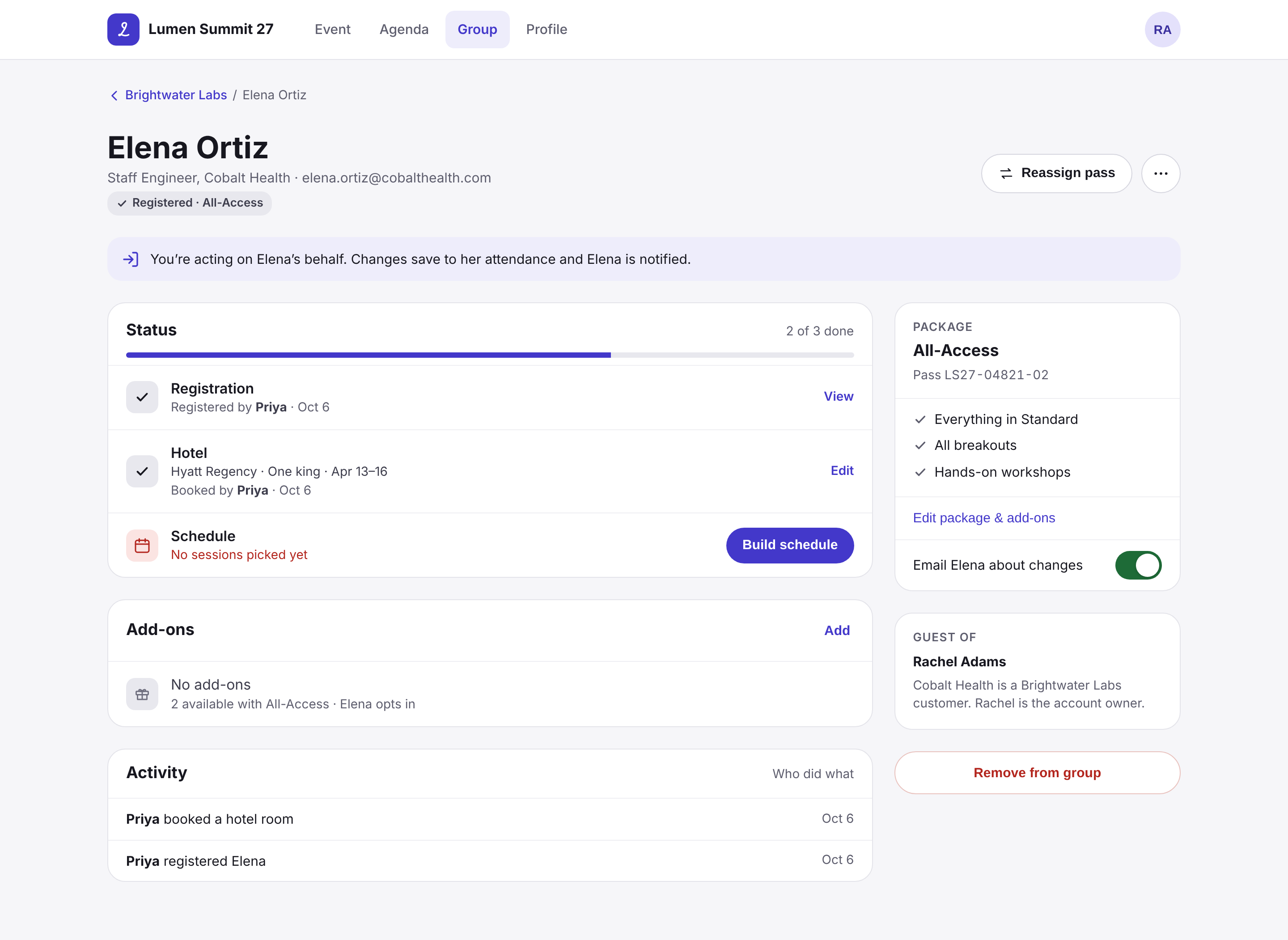
Owners register, book and schedule on a member’s behalf. A banner makes clear who you’re acting for, and the member hears about it.
“I know exactly who needs what.”
03 — Research
We listened before we designed anything.
We got on calls with enterprise event teams who manage group passes and we listened. We wanted to learn how they handled groups today and where it broke. What we heard changed the problem we thought we were solving.
Customer calls with enterprise event teams
#1
request from our Client Advisory Board
9
enterprise customers, multiple calls each
In person
working sessions at our annual user conference
2
shapes of the same problem: small and high-touch, large and bulk
Including teams from
What we heard
Executive assistant
Software
“I register and manage everything for executives who never log in.”
Sales leader
Advisory
“My guest’s hotel and schedule are on me, and I’m not sure what they still need.”
Event marketing
CPG
“The tickets go to whoever won that week. The name changes, the pass doesn’t.”
Event ops
Entertainment
“Some of our attendees don’t have an email we can use. The system assumes they do.”
Program manager
Software
“We buy a block of passes up front and figure out who gets them later.”
Event ops
Software
“The screen says it’s done. I’m still chasing people over email.”
Three steps between an owner and their people.
The old flow was organized around inventory. Owners could count passes from the top, but the people they were responsible for sat three steps away from where they started.
Portal → Manage → Dashboard → Manage → Members
Two “Manage” clicks before you see a single name. Then again for every package.
- 1
The group lived inside the card
Group management started as one card in the attendee portal, next to your own pass and agenda. Owners came in as attendees first and owners second.
- 2
A dashboard of packages, not people
The first view was a card per package with pass status counts. Good for inventory. You could see how many were still invited, but not who.
- 3
People were three steps deep
Only after a second Manage, inside one package, could you see members and change their passes. Working across packages meant backing out and drilling in again.
What kept coming up
Across every call, small high-touch groups and large bulk ones alike, the same four tensions surfaced. None of them were about the interface. They were about who is responsible for whom.
Pattern 01
Proxy is the primary case
Owners act on behalf of attendees as the main job, not an edge case.
Pattern 02
Ownership needs to be shared
One owner can’t carry enterprise groups, but shared ownership can’t blur accountability.
Pattern 03
Completion hides what’s unresolved
A single “passes available” count showed what was left to hand out, not what was still pending. Accounted for isn’t the same as resolved.
Pattern 04
The pass isn’t always the person
Some groups had attendees with no usable email. Others rotated who held a pass week to week. Tying every pass to one named email broke both.
The problem wasn’t the one we were handed
Underneath it all
Groups are families, teams, and ecosystems, not lists of individuals.
Responsibility flows down a structure, not across a flat list. Some people pay, some decide on their own, and others just show up.
Principles we committed to
Most of the time these aren’t opposites. Fast can also be accurate. The principles decide what wins when they do conflict. Together they set how the product should feel: less like filling out a form, more like taking on responsibility for people.
Confidence
over speed
“I can close the tab knowing everyone’s handled.”
From: The reframe
Stewardship visibility
over registration completion optics
“I see who I’m responsible for, not just how many seats are filled.”
From: Pattern 01
Status accuracy
over positive framing
“If something’s still open, it tells me, even when ‘done’ would look nicer.”
From: Pattern 03
Reassignment as a deliberate owner act
over frictionless swaps
“Handing off someone’s pass feels like a decision I made, not a drag-and-drop.”
From: Pattern 02
Hard constraint
No completion state can obscure incomplete guest obligations.
04 — Craft
Where we put our care.
Research gave us four principles. Craft is where they had to hold up: first in the structure, then in the screens, then in the details that mattered. Not all of it landed the first time.
Where it fell flat
My first concept was a table of passes, with a member assigned to each one. People read every row as an attendee, so an empty row looked broken. Giving someone several passes or add-ons meant entering their name three times. So we flipped it: packages up top with their passes, people below. That pattern landed, and the group view is built on it.
- Empty rows read as missing people, not open passes
- One member with add-ons meant three rows and three name entries
All-Access
Executive
- Inventory lives with the package, so open passes stop looking like missing people
- One member, one row, with add-ons attached to them
What I took from it
If I keep having to explain a model, it’s not working.
Every pass is accounted for.
Owners now land on their group straight from the attendee portal. Packages and their status sit on top, and every member sits directly below.
Packages
Standard
All-Access
Executive
Members · 9
What needs attention comes first
Before any counts, owners see how many members still need something and why. One tap filters the list to just them.
Pending is its own state
Each package shows registered, pending and open separately. A package can’t look finished while invites are still out.
Open passes are assigned from their package
"Assign 1" sits on the package that has room, and "All assigned" confirms the ones that don’t. Adding a member stays one tap away at the bottom.
Holds: Status accuracy over positive framing
Holds: Stewardship visibility
Before · three screens to a name
After · one
Owners act on each member’s behalf, and members stay informed.
Proxy is the main job, not an edge case. Owners can register, book a hotel and build a schedule for someone else, and the screen is honest about what’s still open.
Ready for the event
Schedule
Member detail
Member
Under 18
Package
Standard
Executive
Invite or register, minors included
It’s clear who you’re acting for
It stays pinned while you work, so a change never lands on the wrong person.
"Ready" means ready
The checklist doesn’t call a member done while a hotel or schedule is still open.
Identity is contextual
Owners choose to invite or register. Minors skip email, and the owner stands in as the responsible adult.
Holds: Confidence over speed
Hard constraint: no completion state hides open obligations
Groups can have several owners, attending or not.
Enterprise groups are too big for one person to carry. Sharing ownership only works if it stays clear who did what, so every change carries a name.
Owners
Billing
Ownership isn’t attendance
An executive assistant can run the group without a pass. Non-attending owners live in settings, not the member list.
Shared, but never anonymous
Every change on a member shows who made it, like the "By Priya" on Marcus’s checklist, so co-owners can split the work without second-guessing each other.
From: Pattern 02 — ownership needs to be shared
Details we cared about.
Small calls nobody asked for, each one a choice about how the product should feel.
Add-ons included by default
Add-ons the member opts into
Owner control over smart defaults
Extra things should be chosen, not assumed. Admins can still set defaults if they want them.
Buy a new package
Swap within your passes
Changing a package isn’t a purchase
Moving someone between packages the group already owns reads as a swap, not a new charge.
Reassign in one drag
Reassign with a confirm
Reassigning is a decision
Handing someone’s pass to another person is deliberate, so it asks before it happens.
Email required
Email when it fits
Not everyone has an email
Minors skip it entirely. Adults are asked for one because it keeps them informed.
Owners felt confident taking responsibility for their people.
Group Pass Management launched before I left, and we judged it by sentiment. People saw that it covered the core cases, proxy included. More than that, it answered the problem underneath: delegation and stewardship.
Delivered
The #1 request from our Client Advisory Board, shipped.
Customer success
Their read: this is the one clients keep asking for, and it covers the cases they’ve been working around.
Launch
Featured at the company-wide product release, demoed by product marketing.
The feeling we designed for
“I can close the tab knowing everyone’s handled.”